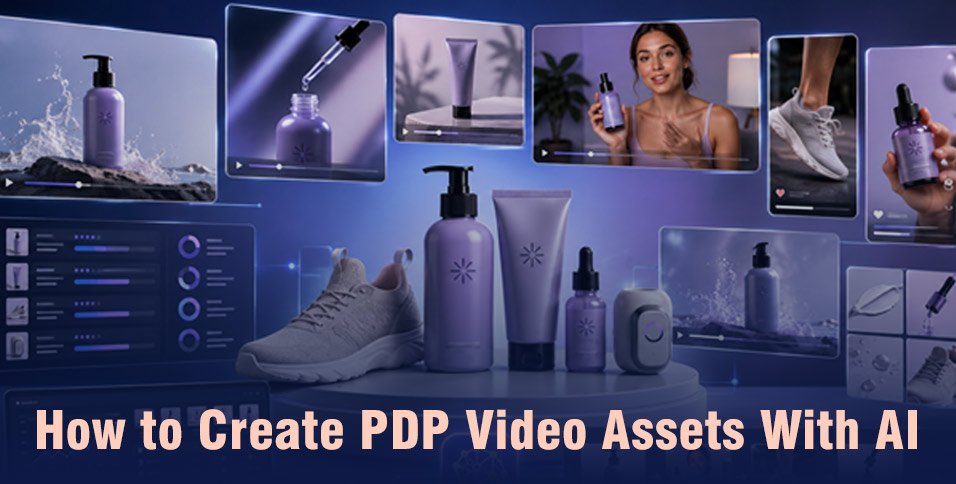
AI Product Videos can help ecommerce teams turn product photos, brand rules, and campaign ideas into PDP assets much faster. The strongest workflow starts with accurate product references, then creates hero shots, feature clips, demos, and UGC content from the same visual direction. Keep the product consistent, make each video answer a buying question, and build reusable assets that can also support ads and social campaigns.
A product detail page has a difficult job. It needs to answer questions about appearance, size, features, use, and value before the shopper can touch the item.
That is where AI Product Videos are becoming useful. Instead of planning a separate production for every item, ecommerce teams can build product-focused videos from existing photos, product information, brand rules, and creative references.
Video can also play a larger role in the buying journey. One Forbes Communications Council contributor reported that ecommerce video experiences on a brand’s own site produced conversion rates more than three times the site’s average in their business. That is one company example, not a universal benchmark, but it shows why product page video deserves attention.
The goal isn’t to fill every PDP with random motion. The goal is to create useful visual assets that help shoppers understand the product and give marketing teams material they can reuse elsewhere.
What should a PDP video include?
A useful PDP video should show the product clearly, explain its main value, and help the shopper understand how it looks or works. A strong asset set usually combines a clean hero shot, feature callouts, close views, a short demonstration, and one more natural use case.
Think of the product page as a visual sales conversation. Each clip should answer a question that could otherwise slow a buying decision.
Start with three asset types
For most catalogs, a practical set includes:
- Hero video: A clean view that establishes the product, shape, packaging, and overall look.
- Feature clips: Short scenes that focus on one benefit, material, function, or product detail.
- Use case video: A person wearing, holding, opening, applying, or using the product in context.
AI Product Videos make this structure easier to repeat across several SKUs. Instead of inventing a new creative system for every item, you can keep the same camera logic and brand style while changing the product information.
How do AI Product Videos scale?
AI Product Videos scale best when the brand treats each product as part of one production system. Keep approved product references, lighting rules, framing, text style, and campaign direction together. Then create new videos from those rules instead of rebuilding the creative brief for every SKU.
This matters once a catalog grows from ten products to hundreds.
A skincare brand, for example, may want the same product reveal for every serum. A footwear store may want side views, material close views, walking shots, and styling videos for every color. The creative structure stays similar, but the product must remain accurate.
This is where an agent-based workflow can help.
Invideo Agent works around a persistent project context rather than treating every generated shot as an isolated request. Product references, brand direction, approved looks, and other project information can stay connected as the team moves between scenes and assets. Its role-based agents can work across planning, generation, and editing.
For PDP production, that means a team could brief invideo Agent with the product, visual rules, and campaign direction, then develop hero footage, product demonstrations, statics, and ad variations from the same project context. This fits ecommerce teams that need many related assets without changing the visual identity each time.
Invideo Agent Two is invideo’s recent launch as a frontier intelligence agent for serious creative work. This intelligent agent can read materials such as brand books, PDFs, videos, and other project references, retain project context, and pass information between specialist agents. That approach can be useful when a large catalog has many product rules and approved references that must stay available across repeated production work.
How do you keep products consistent?
Product consistency starts with strong references. Give the AI clear images from several angles, show important packaging details, define the real scale, and explain materials that affect how the product should look. Once you approve a visual direction, reuse those references across related shots rather than redefining the product each time.
This is one of the most important steps when creating AI Product Videos.
A bottle that changes label position between scenes can distract shoppers. A shoe that gains a different sole shape creates a similar problem. Small details matter more on a PDP because the viewer is actively inspecting the product.
It is recommended to work from real product images with multiple angles and detail views.
A simple reference pack can contain:
- Front, rear, side, and three-quarter product views
- Close views of logos, labels, textures, buttons, and packaging
- A scale reference, such as the product held in a hand
- Notes on material, finish, reflection, softness, or movement
- Approved brand colors and background direction
- The final hero image that other shots should visually match
Invideo Agent can keep those product references inside the wider project context. This becomes useful when the same SKU appears in a PDP video, social ad, creator style clip, and later campaign variation.
The same principle applies during editing. The Slate video editing workspace inside invideo Agent can bring approved clips, product footage, text, audio, and other campaign assets onto one timeline while retaining the wider project context.
Which AI Product Videos fit ads?
The most useful AI Product Videos for performance marketing are assets that can serve more than one placement. A clear product demonstration may work on a PDP, then become part of a paid social ad. A creator-style explanation can support both product education and campaign testing with a different opening or call to action.
This is where PDP production and performance marketing start to overlap.
A PDP might need a calm feature demonstration. Paid social may need a faster opening. A UGC campaign may need someone explaining the same benefit directly to camera. The product story is related, but the framing changes with the placement.
Invideo Agent can support this kind of shared production workflow because it can combine product information with AI actors, voiceovers, testimonials, explainers, and product films. Instead of treating PDP assets and performance creative as two completely separate projects, teams can build from the same approved product foundation.
For example, a single product launch could produce:
- A clean PDP hero film
- A fifteen-second feature demonstration
- A creator-style product explanation
- A testimonial-style version
- Several opening hooks for paid social
- Vertical and landscape campaign cuts
Invideo Agent is especially relevant here when the same creator, product, and visual rules need to carry across several related scenes.
For shots that depend on speech and finished sound, Google Veo 3.1 can create talking head UGC, product explainers, testimonial-style clips, and social ads with dialogue, ambience, and effects generated with the picture. The model supports up to 4K and landscape or vertical formats, making it suitable for product films, demos, promos, real estate tours, and explainers. It is particularly useful when a brand wants a scene to open on the product, end on the logo, and already include synced sound in the first result.
Build one repeatable PDP workflow
The real advantage of AI Product Videos appears when teams stop thinking in terms of individual clips and start building a repeatable catalog process.
Start with one SKU. Produce the complete asset set, review it closely, and document what should remain the same for the next product. This gives the team a working visual system before production expands.
A practical production sequence
1. Gather product inputs
Collect clean product images, dimensions, feature information, packaging views, brand rules, and any approved creative references.
2. Define each video’s job
Decide what the hero video explains, which details deserve separate clips, and whether a creator style demonstration would add useful context.
3. Lock the product look
Approve the product appearance before generating a large number of scenes. Check shape, logos, packaging, proportions, and materials.
4. Create the core PDP set
Generate the hero shot, feature views, demonstration, and lifestyle context first. These become the main visual building blocks.
5. Expand into campaign assets
Reuse approved shots and product references when building performance ads, UGC variations, social videos, or launch content.
Invideo Agent can sit across these stages because its workflow covers planning, generation, project memory, and editing rather than only creating a single clip. It also covers storyboarding, role-based agents, project collaboration, and timeline editing within the wider agent workflow.
Measure and improve every asset
Creating more AI Product Videos isn’t the final goal. The videos still need to help shoppers understand the item and support the wider marketing plan.
Review PDP assets using simple questions. Can a new shopper identify the product immediately? Can they understand the main feature without reading a long paragraph? Does the product look the same across every scene?
For performance marketing, add another layer of measurement. Track which product angles, demonstrations, creator styles, and opening scenes repeatedly lead to stronger campaign results. Those lessons can guide the next production batch.
Invideo Agent can help teams turn a proven creative direction into more related assets while keeping the same project references available. That makes the creative learning from one campaign easier to carry into the next set of PDP videos.
The best workflow is a loop:
Create → review → publish → measure → refine → expand
That approach keeps production tied to real customer and campaign needs rather than generating assets simply because AI makes more output possible.
Conclusion
AI Product Videos give ecommerce teams a practical way to build richer PDP experiences across larger catalogs. The strongest approach starts with accurate product references, clear jobs for each video, and one visual system that can support hero footage, feature clips, demonstrations, UGC content, and performance campaigns.
Tools such as invideo Agent become most useful when production involves many connected assets. Keeping the product, creator, brand rules, and creative direction inside the same project can make it easier to move from one SKU to a full campaign without rebuilding the process each time.
Start with a small group of products, create a repeatable asset set, and measure what shoppers and campaigns respond to before expanding the workflow.
Frequently Asked Questions
What are AI Product Videos?
AI Product Videos are product-focused videos created partly or fully with generative AI tools. They can include product hero scenes, demonstrations, feature explanations, creator-style videos, and campaign clips. The best workflows start with clear product references so the item stays visually accurate throughout the final asset.
Can AI create videos for every SKU?
Yes, AI can support catalog-wide production when the creative process is structured around repeatable product inputs and visual rules. Teams should still review each SKU before publishing. Product shape, labels, materials, scale, colors, and packaging should be checked carefully rather than assuming every generated result is ready to publish.
What product photos should I provide?
Start with clear front, side, rear, and three-quarter views. Add close images of logos, labels, packaging, textures, and other details that matter to the buying decision. For products where size is important, include a scale reference. Better source material gives the production workflow more information about what needs to remain visually consistent.
Can PDP videos become social ads?
Yes. A PDP demonstration can become useful campaign material when it is reframed for the placement. A feature clip might become part of a short social ad, while a product explanation could be paired with a creator-style introduction. Keeping approved product references together makes it easier to create these related versions without changing the core product look.
How many videos does a PDP need?
There is no fixed number that works for every product. Start with the information the shopper needs most. A simple product may only need a hero video and one demonstration. A more technical product may benefit from several feature clips, setup guidance, use cases, and a short explanation from a person. Quality and usefulness matter more than adding video for its own sake.