A YouTube thumbnail is the first thing viewers see — and it can make or break a video’s click-through rate. Kimg AI gives creators direct access to Banana AI, a capable image generation and editing model that handles everything from text-to-image creation to complex photo composition. Whether building a personal channel or managing content for a brand, this guide walks through exactly how to use it for thumbnails that actually get clicks.
I. Why Thumbnails Matter More Than Most Creators Realize
Thumbnails are small, but their impact is anything but.
- YouTube’s algorithm factors in click-through rate (CTR) when determining how widely a video gets recommended — a compelling thumbnail directly influences that number.
- Viewers spend less than two seconds deciding whether to click, which means the visual needs to communicate the video’s value almost instantly.
- Consistent thumbnail style across a channel builds visual identity, making content more recognizable in crowded feeds.
II. What Banana AI Can Do for Thumbnail Creation
The Banana AI model available on Kimg AI isn’t a one-size-fits-all generator. It supports several distinct workflows that each serve a different thumbnail need.
Text to Image Generation
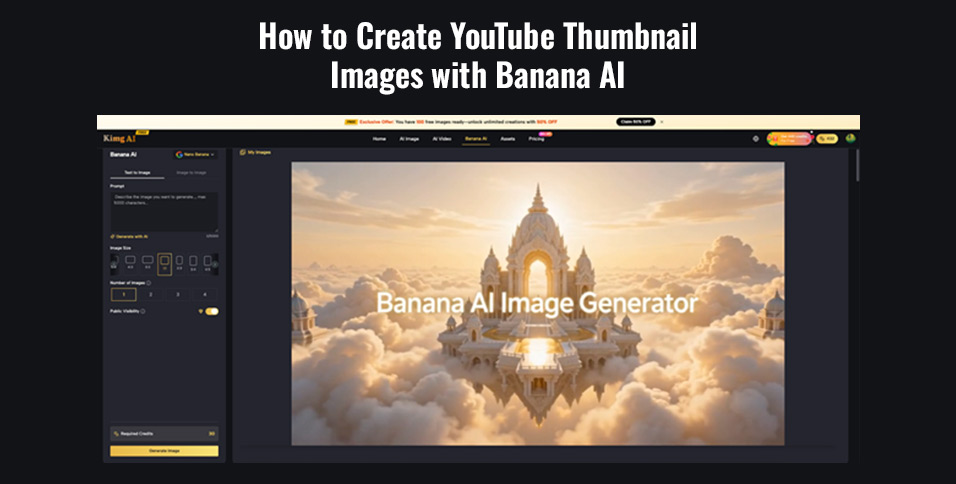
- Type a detailed description of the thumbnail scene, and the model constructs it from scratch — no existing photo needed.
- This is ideal when a creator needs a completely custom visual concept that no stock photo could provide.
- Prompts can go up to 5,000 characters, leaving room for very specific creative direction.
Image to Image Editing
- Upload an existing photo or screenshot, then describe how it should be changed — background, style, mood, or composition.
- The model preserves the structural core of the original image while applying the requested modifications.
- Useful for creators who already have a photo but need it transformed into something more visually striking.
Multi-Image Composition
- Combine multiple reference images into a single cohesive scene.
- This supports thumbnails that blend a creator’s face, a branded background, and a product or graphic element together.
- The model handles the visual merging, so there’s no need for layer-by-layer editing in separate software.
III. Setting Up the Right Thumbnail Specs
Before generating anything, getting the technical parameters right saves a lot of back-and-forth.
- Aspect ratio: YouTube thumbnails use a 16:9 ratio — always configure output to match this before generating.
- Resolution: The Banana AI Image Generator on Kimg AI supports output up to 4K, which keeps thumbnails sharp even on large screens or in YouTube’s preview panels.
- Reference images: The page supports uploading up to 8 reference images in a single session, which is particularly valuable when compositing a face, a background, and a logo into one unified design.
IV. Writing Prompts That Actually Work
The quality of a thumbnail is almost entirely determined by the quality of the prompt. Vague instructions produce vague results.
Define the subject precisely
- Don’t just write “a person” — write “a woman with a surprised expression, mouth slightly open, eyes wide, pointing at a laptop screen.”
- Specificity in facial expression, clothing, and pose directly affects how usable the output is.
Describe text overlays in the prompt
- If the thumbnail needs bold text like “You’re Doing This Wrong,” describe its placement, weight, and color in the prompt itself.
- Example: “Bold white text with a black drop shadow reading ‘You’re Doing This Wrong’ positioned in the upper left corner.”
Set the visual mood
- Include descriptors like high contrast, vivid colors, cinematic lighting, or dramatic shadows to push the thumbnail toward something that pops in a feed.
- These terms aren’t filler — they consistently affect how the Banana AI Image Generator renders tone and color.
Keep backgrounds purposeful
- A blurred or colored background keeps the subject in focus; a detailed background tells a story.
- Decide which the thumbnail needs before writing the prompt, then describe it explicitly.
V. The Step-by-Step Thumbnail Workflow on Kimg AI
Here’s how to move from concept to final file using the Banana AI Image Maker on Kimg AI.
- Choose a generation mode — Select “Text to Image” for a fully generated scene, or “Image to Image” if starting from a photo or screenshot.
- Upload reference images — If using Image to Image or multi-image composition, drag and drop reference files. Up to 8 images can be uploaded per session.
- Write the prompt — Describe the subject, text overlay, lighting, mood, and background in detail. The more specific, the better.
- Configure output — Set the aspect ratio to 16:9 and resolution to 4K before generating.
- Generate and review — Click generate and review the batch of outputs. The tool can produce multiple variations in one run.
- Refine if needed — If the first output is close but not quite right, use the redo/iterative refinement feature to improve detail and fidelity without starting over.
VI. Getting Better Results Across Banana AI Versions
Kimg AI integrates Banana AI as a model that continues to evolve, with versions like Nano Banana, Nano Banana 2, and Nano Banana Pro each offering incremental improvements in instruction-following and detail rendering.
- For straightforward thumbnails — a clean background, one subject, and a text overlay — the base Banana AI model handles the task well.
- For more complex compositions involving multiple reference images or precise face consistency, leaning on the more capable versions yields noticeably better results.
- When testing a new thumbnail style for a channel, generating multiple variations at once lets creators compare options side by side rather than committing to a single output.
VII. Common Mistakes to Avoid
Even with a strong tool, a few habits consistently produce weak thumbnails.
- Over-packing the scene: Thumbnails with too many elements become unreadable at small sizes. Keep the visual hierarchy simple — one main subject, one supporting element, one text line.
- Ignoring face visibility: Thumbnails with a clear, expressive human face consistently outperform those without one. If the channel has a host or presenter, uploading their photo as a reference image and describing their expression in the prompt is worth the extra step.
- Skipping the refinement step: The first generation is a draft, not a final product. The iterative refinement feature in the Banana AI Image Editor exists precisely to close the gap between a good output and a publish-ready one.
- Using the wrong aspect ratio: Generating a square or portrait image and then cropping it to 16:9 degrades quality and cuts off composition elements. Always set the ratio before generating.
Conclusion
Thumbnails don’t require a design team or expensive software. With the right prompts and a clear understanding of how the Banana AI Image Generator handles text, reference images, and composition, anyone can produce click-worthy visuals consistently. Kimg AI puts all of these tools in one place — the only thing left to bring is the creative direction.