People today want more videos, but making them still takes time. Many creators struggle with complex editing tools, skills, and long production processes. This creates stress and slows down sharing ideas with their audience online. However, new AI-influenced tools make video creation much easier, faster, and simpler. One method is AI text-to-video that turns words into clips.
It helps beginners create videos without learning hard editing steps or software. Businesses and students can explain ideas clearly using simple text prompts only. However, many still question the existence of both traditional and AI-influenced methods. For this, the article will show all the necessary differences and how tools like Filmora change the video creation dynamics.
Part 1. Traditional Video vs. AI Video Generator: The Evolution of Content Creation
Making videos used to be a very slow and hard job for everyone. Now, you can use AI-generated video tools to finish work much faster. Review the table below to see how traditional and AI-generated methods differ from each other, and which serves a better purpose:
| Metric | Traditional Video | AI Video Generators |
| Cost | High cost with crew and equipment | Low cost with subscription-based tools |
| Speed | Takes many hours or even days to complete | Creates videos in minutes or hours |
| Scale | Hard to create many video versions | Easily creates multiple versions quickly |
| Quality | High cinematic quality and emotional storytelling | Good quality but less emotional depth |
| Control | Full control over every creative detail | Limited control through prompts and templates |
| Creativity | Strong emotional depth and originality | Limited emotional depth and uniqueness |
| Flexibility | Changes take time and effort. | Easy to edit and update quickly. |
Part 2. How AI Text-to-Video Tools Transform Ideas into Videos Quickly
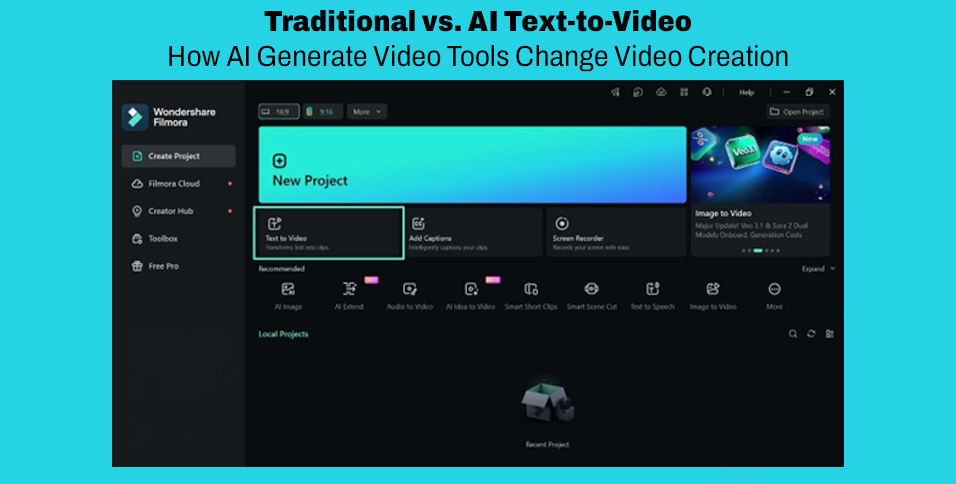
Turning simple ideas into videos once felt slow and difficult for many creators. People look for faster ways to create content without complex tools or skills. This is where Wondershare Filmora helps users turn text into videos quickly and easily. This AI-generated video from text tool offers multiple AI models, such as Sora 2 and Veo 3.1, and generates smooth video transitions between two frames automatically.
To make crafting easier, Filmora has 100+ ready-made AI video prompts and examples. You can also utilize the option of including start and end frames to control your AI video scripting and create smoother transitions. Not only this, but you can also use the idea to video feature to add prompts in multiple languages, which provides direct support for global creators.
Key Features
- Lip Sync: Matches translated voice with lip movement for a natural video appearance.
- Short Clips: Generates short videos, including 4 to 12-second clips, with motion effects included.
- Auto Assembly: Combines visuals, audio, and text into a complete video automatically.
Part 3. How to Create Stunning AI Text-to-Video Content Using Filmora
Turning ideas into videos can feel overwhelming, but AI text-to-video makes it simple. Filmora makes this process easy, offering intuitive tools to generate, edit, and enhance your videos. Let’s explore the steps below to create professional-looking videos with Filmora easily:
Step 1. Open Text-to-Video Feature
From Filmora’s main interface, select the “Text to Video” feature to get started.
Step 2. Create Your Video
Enter your prompt in the “Text Box” and choose an AI model like “OpenAI Sora 2.” After that, opt for the “Generate” button to let Filmora produce your video automatically.
Step 3. Add Generated to Timeline
Now, go to “My Files,” then drag and drop the generated video onto the timeline. Next, preview the generated video to see how it looks for clarity.
Step 4. Export Your Video
When satisfied with the result, opt for the “Export” button to download your generated video.
Conclusion
To conclude, modern tools are changing how we share our stories every day. Using AI text-to-video technology makes creating high-quality clips much faster for everyone. It removes the need for expensive gear or very hard editing skills. Therefore, if you want to save time while looking professional, try Filmora to turn your best ideas into amazing videos.