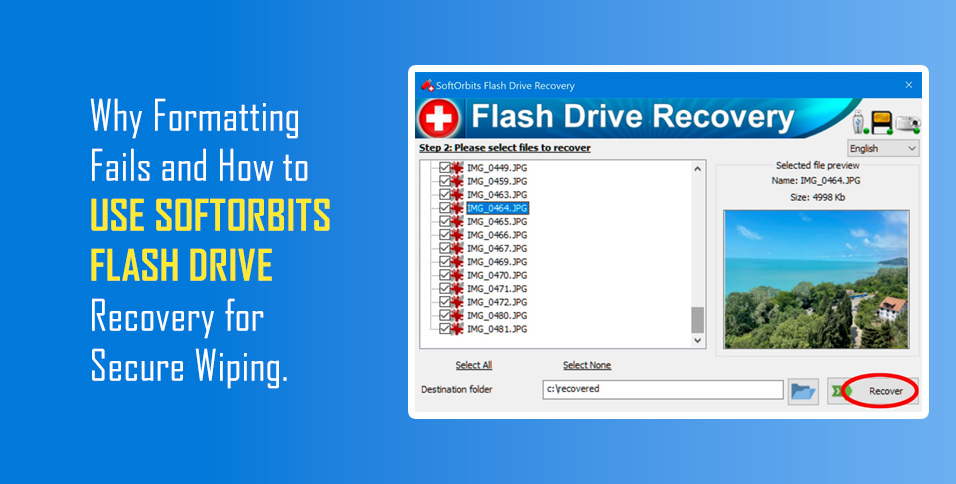
Why Formatting Does Not Erase Your Data
When selling electronics, users delete their personal data via quick formatting or a factory reset. This is a serious error. Quick formatting does not erase previously recorded data. It only removes the information that data exists on the disk. The space is then marked as free for recording.
Factually, 99% of the data remains untouched.
Threats and Real Examples of Leaks
Under this approach, personal data easily falls into public access. This happens when selling phones, laptops, USB drives, and cameras.
- Risk: The new owner can restore personal photographs, document scans, [and] financial data. This can even cause blackmail and fraud.
- Example: When selling an old camera, the memory card contains “deleted” personal photos. Recovery software will find them in minutes.
- Scale: Even files deleted months ago are subject to recovery, until the memory has been completely overwritten. Practical Demonstration (SoftOrbits Flash Drive Recovery)
The SoftOrbits Flash Drive Recovery program visually shows how files can be restored. After scanning the external drive, you will see a list of files previously recorded on the disk, and images can be viewed in the preview window
Instruction (Principle of Operation):
- Launch: The user inserts the memory card and starts Flash Drive Recovery.
- Deep Scanning: The program ignores the file system. The program scans the memory by sectors.
- Search by Signatures: The program searches for signatures (initial and final markers) of files. For example, JPEG, RAW, DOCX.
- Restoration: Even after formatting, Flash Drive Recovery finds and restores thousands of “lost” files.
- Conclusion: If Flash Drive Recovery can find your data after formatting, then any person with computer access can find it.
Secure Wiping: The Only Protection
The only way to guarantee that data will not be restored is multiple overwriting (Wipe).
- Method: Specialized software rewrites every memory sector with random data (zeros, ones) multiple times.
- Standard: Reliable data destruction corresponds to DoD standards (U.S. Department of Defense).
- Advice: Always use secure wiping tools before selling. Simple formatting is a fiction of security.
Comment by SoftOrbits CEO, Eugene Ustinenkov:
“To fully delete information from a drive, it is not enough to delete it; it must only be overwritten. SoftOrbits Flash Drive Recovery can restore any formatted storage medium. Overwriting all memory is the only thing that can guarantee your information does not end up with other people.”
About SoftOrbits
SoftOrbits was founded in 2006. We develop software designed to automate complex photo editing and data management tasks.
Our head office is located at: 9/19, Moo 7, Koh Phangan, Surat Thani 84280, Thailand.