Starting a Shopify store in 2026 is easier than ever on the surface. You can spin up a store in an afternoon, connect a payment gateway, and start taking orders.
What hasn’t gotten easier is making sure those orders are actually profitable.
Shopify’s plans now start around $29/month on annual billing for the Basic tier, with Grow and Advanced plans climbing from there, plus processing fees and additional costs layered on top. If you only look at the plan price and ignore everything else, it’s very easy to grow revenue while your margin quietly disappears.
This guide walks you through how to start a Shopify store in 2026 with a profit-first mindset:
- Choosing a plan that fits where you’re actually at
- Setting up your store the right way
- Understanding the real cost structure
- Tracking costs and profit from day one
Is Shopify still worth starting in 2026?
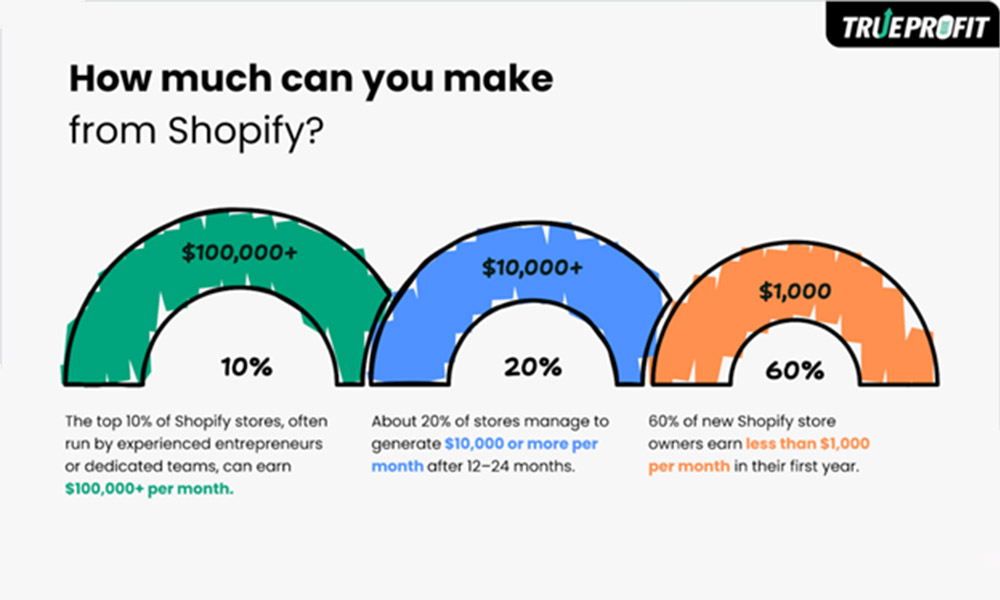
Short answer: yes—if you respect the numbers. According to TrueProfit, 60% of new Shopify stores make under $1,000/month, while 20% reach $10,000+ and the top 10% earn $100,000+ monthly.
Shopify remains one of the most popular ecommerce platforms globally, praised for its ease of use, scalability and ecosystem of apps and integrations. Recent reviews highlight how the platform’s updated Basic, Grow and Advanced plans support everyone from solo entrepreneurs to larger brands, with more sophisticated inventory, tax and shipping tools than a few years ago.
At the same time, most breakdowns of Shopify pricing point out the same thing:
- Monthly plan fee is just the starting point
- You’ll also pay card processing fees on every sale
- You may pay extra for third-party payment gateways
- Apps, themes, shipping and COGS all stack on top
So yes, Shopify is still a great place to start in 2026—but only if you treat “How much does this really cost per order?” as a first-class question.
Step 1: Get clear on what you’re selling (and to whom)
Before you even open Shopify, get specific:
- Who are you selling to?
- What problem are you solving for them?
- Will you build your own brand, or do dropshipping/POD?
- Why your product instead of the dozens they already see on TikTok, Amazon, or Google?
If your answer to “who” is “everyone,” or your reason is “because it’s trending,” you’ll struggle—even in the best-built store.
You don’t need a 40-page business plan. You do need:
- A focused niche (for example, minimalist home office gear for remote workers)
- A product angle that gives you pricing power (quality, design, bundle, speed, customization)
Once that’s clear, Shopify makes the mechanics of selling relatively painless.
Step 2: Choose the right Shopify plan for your stage
Shopify’s main website builder plans (billed annually) now center on:
- Basic – around $29/month when billed yearly (higher if paid month-to-month)
- Grow – around $79/month when billed yearly
- Advanced – starting from $299/month when billed yearly
Card processing via Shopify Payments typically starts around 2.9% + $0.30 per online transaction on Basic, with slightly lower rates on higher plans.
If you’re just starting out:
- Basic is usually enough—unlimited products, core reports, discounting, basic automation.
- Grow and Advanced start to make sense once you have consistent revenue and need better rates, more staff accounts, and advanced features.
The key is to start lean, but not so lean that you cripple yourself. Don’t rush to higher plans just for lower card rates until your volume justifies it.
Step 3: Set up your Shopify store basics
Next, go through Shopify’s setup flow:
- Create your account and pick a store name (you can change the domain later).
- Add your brand basics: logo, colors, typography.
- Choose a free theme to start or invest in a paid theme once you’re confident in your direction.
- Configure your main pages: Home, Catalog/Shop, Product pages, About, Contact, FAQ, Policy pages.
- Set up your shipping zones, taxes, and payment methods (Shopify Payments plus any third-party options you need).
Don’t get stuck endlessly tweaking design. Aim for: Clear navigation, Fast loading time, Mobile-friendly layout and benefit-driven product pages.
You can always refine the look as you go—as long as the basics work and checkout doesn’t break.
Step 4: Add products the right way (not just “list and hope”)
When you add products, think like a buyer and an accountant at the same time.
You need:
- Clear, benefit-focused titles and descriptions
- Strong images (ideally multiple angles and some in-context shots)
- Logical variants (size, color, style)
- Pricing that leaves room for costs and profit
- A cost per item value for each product/variant, so Shopify can calculate cost of goods sold (COGS)
Even if you’re dropshipping, treat cost per item seriously. That single field is the base ingredient for understanding whether a product is actually worth scaling.
Step 5: Understand Shopify’s cost structure before you scale
Before you throw money at ads, it’s worth understanding how money flows out of each order:
- Plan fee – Basic, Grow, or Advanced subscription
- Payment processing – Shopify Payments card rates, plus any extra charges if you use third-party providers
- Apps – upsells, reviews, subscriptions, translations, etc.
- Themes – one-off, but still a cost to recover
- Shipping & fulfillment – carrier rates, packaging, 3PL fees
- COGS – what you pay suppliers or manufacturers
Most new merchants only look at the plan price and headline card rate. In reality, your true cost per order is all of that combined.
If you want a more detailed breakdown, the TrueProfit blog’s guide to Shopify fees explained shows how plan choice, payment method, apps and other costs stack up, while the companion article on Shopify fees per sale walks through how much of each order Shopify and payment processors actually keep.
You don’t need to memorize every percentage. You do need to accept that every product price has to cover far more than just COGS.
Step 6: Launch with simple, focused marketing
You don’t need to be everywhere on day one.
Start with channels that match your product and skill set:
- Basic SEO: write clear product descriptions, answer common questions, structure your site logically.
- At least one primary channel (TikTok, Instagram, YouTube, Pinterest, Google Shopping—wherever your buyer actually hangs out).
- Basic email flows: order confirmation, shipping notification, and a simple post-purchase follow-up.
The goal of your first 50–100 orders isn’t “maximum scale.” It’s to:
- Validate that people actually buy at your price
- See how real-world COGS, shipping and fees hit your margin
- Spot obvious friction points in your store and marketing
Once the basics work and you’ve seen what you’re really left with after costs, you can start pressing the gas.
Step 7: Think in net profit, not just revenue
As orders come in, it’s easy to get fixated on revenue numbers—especially in a world where everyone shares their sales figures. But focusing solely on revenue can be misleading. What really matters is Net Profit—how much you’re left with after all costs, fees, and overhead are accounted for.
Start with a simple model to calculate Net Profit:
Net Profit = Gross Profit – Operating Expenses (including ad spend, fees, shipping, etc.)
For example, if you sell a product for $40 and your COGS is $16, then:
- Gross Profit = Selling Price – COGS: 40 – 16 = $24
Now, you need to subtract:
- Payment fees (2.9% + $0.30)
- Shopify plan
- Apps, shipping, and marketing
- Other overhead costs
If your operating expenses add up to $18, your Net Profit would be:
Net Profit = $24 – $18 = $6
That’s your real profit per order, the money left after paying all business expenses.
If you plug in your numbers and see your net profit is too low, don’t jump to blaming marketing. The real issue might be pricing and cost structure. You could have healthy gross margins, but if your operating costs are too high, your net profit will still be disappointing.
The sooner you spot this, the easier it is to make adjustments and start scaling sustainably.
Step 8: Track costs properly from day one (this is where TrueProfit helps)
At the very beginning, you can get by with:
- Shopify’s basic profit and product reports
- A simple spreadsheet for key costs
- Manual checks of your ad accounts
But the moment you start running serious volume—or using multiple apps and channels—trying to keep everything in your head (or a half-broken sheet) becomes a full-time job.
That’s where TrueProfit comes in.
TrueProfit is a Net Profit Analytics platform built for Shopify and ecommerce merchants. It’s designed to give you a clear, real-time picture of whether your store is actually making money after all those moving pieces: COGS, shipping, transaction fees, taxes, apps, and ad spend.
At a high level, TrueProfit offers six core features:
- A real-time profit dashboard
- Accurate cost tracking
- Ad spend sync from major platforms (Meta, Google, TikTok, etc.)
- P&L reporting over any time range
- Customer value insights (how profitable customers are over time)
- Mobile monitoring and all-store view if you run multiple Shopify stores
For merchants who are new to selling online or already have steady revenue, cost tracking is one of the most challenging parts:
TrueProfit lets you track:
- COGS for each product
- Shipping and fulfillment costs
- Transaction fees and payment charges
- Taxes and custom cost lines (like packaging, fees, or per-order extras)
Instead of trying to manually reconcile all of that, you see the combined effect inside a single profit dashboard. That makes it much easier to answer questions like:
- “Is my business really profitable after all costs are subtracted from revenue?
- “Which products are actually profitable after fees and shipping?”
- “Is this discount code still worth running?”
“Can we afford to spend more on ads for this item?”
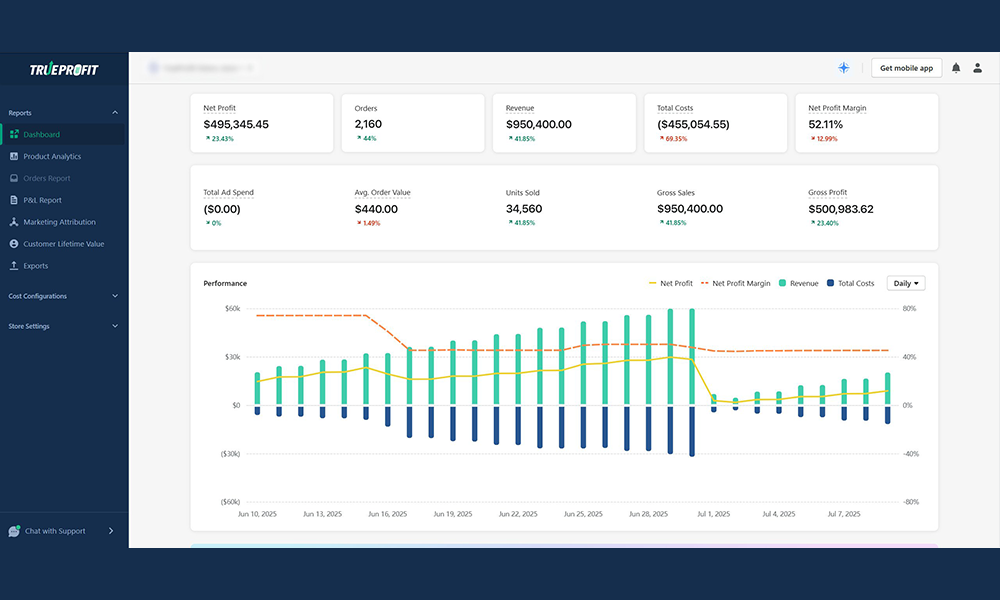
Shopify’s built-in reports are still a good starting point for brand-new or very small stores that just need a basic gross profit view. But as you move into that medium to upper-medium stage—steady revenue, multiple channels, more complex costs—TrueProfit helps you graduate from “I think we’re profitable” to “I know exactly where the money goes.”
Final thoughts: Start simple, but start profit-first
Starting a Shopify store in 2026 isn’t the hard part anymore. The hard part is starting in a way that doesn’t burn you out—or your bank account.
Do that, and “starting a Shopify store” stops being just another to-do list item—and becomes the foundation for a business that actually has room to grow.