
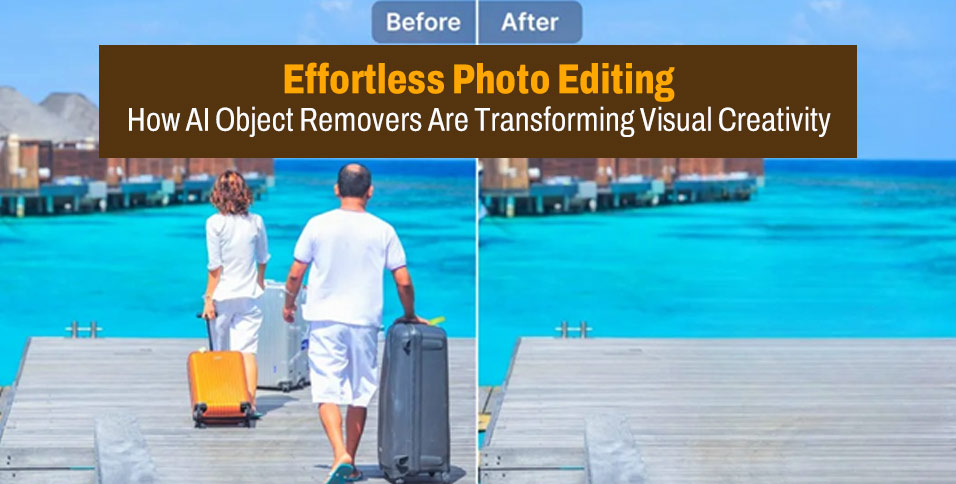
In today’s world, visuals speak louder than words. Whether you’re a content creator, small business owner, or just someone who loves sharing memories online, photos play a huge part in how you express yourself. But what happens when your perfect shot has something (or someone) in the background that ruins the moment — a stranger walking by, an unwanted object, or even a distracting signboard?
Thanks to AI-powered tools like object remover, cleaning up your photos has never been easier. With just a few clicks, you can erase unwanted elements from your pictures and make them look professional, polished, and ready to impress.
Let’s dive into how these smart tools work, why they’re so popular, and how they’re revolutionizing creative editing across industries — from influencers to eCommerce brands.
What Is an Object Remover?
An object remover is an advanced AI-powered tool designed to identify and eliminate unwanted elements from photos or videos seamlessly. Instead of manually retouching your images using complex software like Photoshop, you can simply upload your picture, select the area you want to remove, and let AI do the magic.
The best part? You don’t need any technical skills or editing experience. These tools use intelligent algorithms that analyze the background, fill in the missing areas naturally, and deliver a clean, high-quality image in seconds.
Imagine removing a random tourist from your vacation shot, erasing a product label from a marketing image, or clearing clutter from your living room photos before posting them online — all with zero effort.
Why Everyone’s Talking About AI Object Removal
AI object removers are no longer just for professional photographers. They’ve become an essential part of everyday photo editing for creators, businesses, and casual users alike. Here’s why:
1. Time-Saving and User-Friendly
Traditional photo editing can take hours — even for simple fixes. But with AI tools like object remover, you can remove unwanted objects in seconds. Just select, erase, and download. It’s that simple.
2. Professional-Level Results Without the Cost
Hiring a professional editor or learning advanced Photoshop techniques can be expensive and time-consuming. AI object removers give you near-professional quality for free or at a fraction of the cost.
3. Perfect for Content Creation
For influencers, social media marketers, and photographers, visual perfection matters. Clean, distraction-free images help your content stand out on platforms like Instagram, TikTok, and Pinterest — where first impressions decide engagement.
Real-World Scenarios: How People Are Using Object Removers
AI photo editing isn’t just a trend — it’s a game changer for how people create and share content. Here are some practical examples of how an object remover can make your visuals shine:
🎬 TikTok Creators and Influencers
Imagine filming a fun outdoor video, only to realize a random person walked into the background. Instead of re-shooting, creators can use tools like remove people from photos to fix the problem instantly. The result? A clean, distraction-free video thumbnail that keeps the focus where it belongs — on you.
🛍️ E-Commerce and Product Photography
Online sellers know how important clean visuals are for conversions. A cluttered background or reflection can ruin a product’s appeal. With AI object removers, you can quickly eliminate unnecessary elements, making your product photos look studio-quality — even if they were taken at home.
🏞️ Travel and Lifestyle Bloggers
When you visit a popular destination, it’s nearly impossible to get a photo without crowds. Instead of waiting for the perfect moment, travel bloggers use AI tools to remove random tourists, signs, or objects, keeping the focus on the location and mood of the image.
🎓 Students and Designers
From presentations to design portfolios, students can use object removers to make their visuals look sleek and professional — without spending hours editing.
How Object Removers Work: The Magic of AI
Behind the scenes, AI object removers use a process called inpainting. Here’s how it works in simple terms:
- Detection: The AI scans your photo to identify the object or person you’ve selected.
- Analysis: It understands the surrounding pixels — color, lighting, patterns, and depth.
- Replacement: The removed area is filled in with a background that matches naturally, creating a seamless finish.
This is what makes AI tools so powerful — they “think” like a professional editor, but work much faster.
Why Object Removers Are Perfect for Social Media
We live in a world of constant visual storytelling. Whether it’s TikTok, Instagram Reels, or YouTube Shorts, your audience scrolls fast — and only clean, captivating visuals can make them stop.
AI-powered object removers help you maintain that polished aesthetic across your content. You can fix distractions, clean up your frames, and post confidently without worrying about messy details in the background.
For example, a lifestyle influencer might shoot a skincare tutorial in her bedroom. Later, she notices a bottle or towel lying in the background. Instead of reshooting, she simply removes it using an AI tool — saving time while keeping her feed visually cohesive.
Tips for Using Object Removers Effectively
Here are some quick, practical tips to get the best results from AI object removers:
✅ 1. Choose the Right Tool
Not all object removers are created equal. Some tools are better at handling detailed textures or complex backgrounds. Start with reliable options like object remover for smooth, natural results.
✅ 2. Use Smaller Selections for Precision
If you’re removing multiple small objects, it’s better to do it one by one. This ensures the AI can analyze the background accurately and fill it in cleanly.
✅ 3. Adjust Lighting and Contrast
Sometimes, after removing an object, slight brightness adjustments can make your photo look even more natural. Most AI editors include quick sliders for fine-tuning.
✅ 4. Keep It Realistic
While it’s tempting to over-edit, aim for authenticity. The goal is to enhance your photo — not make it look artificial.
The Future of AI in Visual Editing
AI tools like object removers are just the beginning. From automatic color correction to background generation and even AI lip-syncing videos, creative automation is changing how we produce digital content.
For example, many creators now use AI lip sync tools such as lipsync.video to make engaging short videos. They can sync dialogues, songs, or voiceovers perfectly — creating viral reels and marketing content in minutes. Just like object removers, these tools are saving creators hours of manual work while boosting creativity and reach.
As AI continues to evolve, we can expect even more powerful and intuitive features — turning anyone, regardless of skill level, into a visual storytelling pro.
Conclusion: Your Creativity, Elevated
Whether you’re editing travel shots, cleaning up product photos, or crafting viral social media content, AI-powered tools like object remover are redefining what’s possible.
They give you the power to create clean, captivating visuals in seconds — no Photoshop skills, no expensive software, no frustration.
So the next time an unwanted photobomber or messy background tries to ruin your perfect shot, don’t stress — just let AI handle it. With the right tools, your creativity can truly shine without limits.








